


Creating a personalized customer experience is key to closing a deal. But creating this experience can be challenging without relevant client information. Your sales team needs more than a name, email, and favorite color to turn a lead into a "won" deal.
That's where Customer Relationship Management (CRM) software becomes essential to stay in the game!
In the realm of CRM solutions, two major players dominate the market: Pipedrive and HubSpot. You may be familiar with these industry buzzwords, but the question remains: how do Pipedrive and HubSpot compare?... and which one is the best fit for you?
In this article, we'll delve into the intricacies of Pipedrive vs HubSpot. You'll understand their features, benefits, and advantages to determine the ideal CRM for your business!
- 01 Pipedrive vs HubSpot: overview
- 02 What's the difference between Pipedrive and HubSpot?
- 03 Pipedrive pros and cons
- 04 HubSpot pros and cons
- 05 Pipedrive compared to HubSpot
- 06 HubSpot compared to Pipedrive
- 07 Features comparison
- 08 Pipedrive vs HubSpot: Which is the best for your business?
- 09 Alternatives to Pipedrive & HubSpot
- 10 Promotions on Prospecting software
Start saving on the best SaaS
Secret has already helped tens of thousands of startups save millions on the best SaaS like Microsoft Teams, Google Workspace & many more. Join Secret now to buy software the smart way.

01 Pipedrive vs HubSpot: overview
To kick things off, let's start by clarifying that HubSpot is an inbound marketing and sales software. It provides multiple products for the different needs of your business in the form of what they call "hubs". Their CRM suite includes marketing, CMS, operations, customer service, and sales hubs.
In contrast, Pipedrive is a CRM software focused on sales processes. As its name suggests, this tool is big on creating visual pipelines. But it doesn't stay behind when it comes to managing contacts and tracking communications. It also offers a feature for email marketing campaigns.
Considering this, the article will compare HubSpot CRM vs Pipedrive. We'll dig into the key features to consider when evaluating CRM software and explore how each solution stacks up against one another.

Reporting and analytics
Pipedrive offers deep insights into the sales pipeline and the ability to add widgets from reports you've built into the dashboard, while HubSpot has more robust reporting and analytic features, allowing you to create complex reports.

Pipedrive
HubSpot
Contact and lead management
Pipedrive has a leads inbox that captures contacts from forms on your website and provides custom fields for your contacts, organizations, and deals, while HubSpot offers similar features but adds filter options with different custom fields to prioritize your outreach
Pipedrive
HubSpot
Communication and collaboration
Pipedrive allows you to add people from your team and enable tier permissions, as well as assign team members to deals and monitor their engagements, whereas HubSpot offers similar features but with options to create contact lists you can send email sequences to
Pipedrive
HubSpot
Ease of use
Pipedrive's user interface is intuitive for essential sales features, but the learning curve is steep for the logic behind workflows, whereas HubSpot is user-friendly software that offers a basic tutorial at the beginning, however there is a period of adjustment before leveraging all its features
Pipedrive
HubSpot
Pricing plans
Pipedrive's pricing is affordable but doesn't offer a free plan, whereas HubSpot offers a free plan but its paid subscriptions for Professional and Enterprise plans are costly.
Pipedrive
HubSpot
Sales forecasting
Pipedrive allows you to estimate your future revenue and keep track of your sales team performance, along with monitoring cycle length and revenue fluctuations, while HubSpot offers the same as Pipedrive but with more customizable forecast categories and the ability to check forecasts on the HubSpot mobile app.
Pipedrive
HubSpot
Integrations
Pipedrive has 350+ integrations with other service providers like Zoom, Slack, Zapier, DocuSign, Asana, etc., whereas HubSpot offers 1,400+ integrations with other service providers, including Mailchimp, Salesforce, Stripe, Intercom, G2, etc.
Pipedrive
HubSpot
Positive reviews
Pipedrive is the best CRM for customization of the sales pipeline, but customers express the need for advanced features, while HubSpot has more advanced features for flexibility and collaboration, but not for customers on a budget.
Pipedrive
HubSpot
Customer support
Both software provide 24/7 customer support through email, chat and phone support, with Hubspot offering additional support through the HubSpot Academy and the HubSpot community.
Pipedrive
HubSpot
Sales pipeline management
Pipedrive allows you to identify critical activities at a glance with color contrast and rotting times, making it easy to follow up with leads, whereas HubSpot provides an overview of your current deals and their priority but lacks key indicators to prompt action or follow-ups
Pipedrive
HubSpot
02 What's the difference between Pipedrive and HubSpot?

Pipedrive's Projects Feature View
Pipedrive
Stay focused on sales and collect more leads with this lead management software
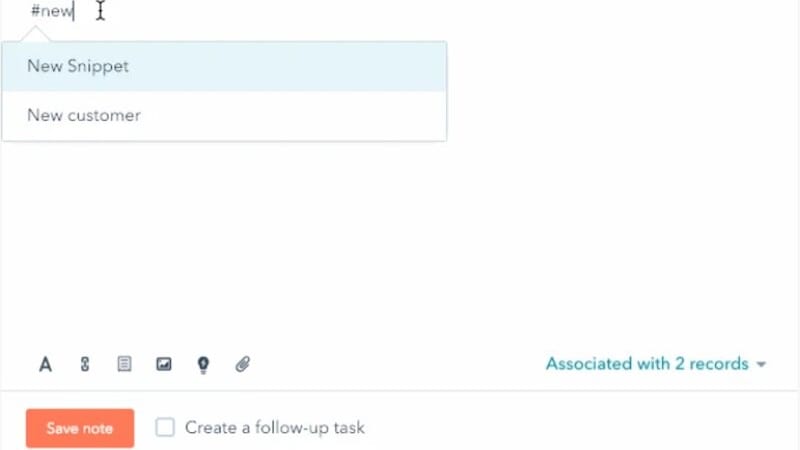
HubSpot's Snippet Email Automation Feature
HubSpot
The HubSpot suite leverages AI to streamline managing your customer throughout their life cycle: from website visits and form completions to phone calls, email exchanges, quote signing, support, and upsells.
The main difference between the HubSpot CRM and Pipedrive is the complexity. Pipedrive is a tool created with the best interest of your sales team in mind to focus on simplicity and quick application. While HubSpot is a tool created for complex systems. It accommodates businesses with a demand for customization and a framework as a foundation for enhanced agility.
In terms of features, both tools have the essential functionalities you would expect from a CRM. Of course, HubSpot offers products—or hubs—for a wide range of business activities. Still, there are some slight differences in sales features.
For example, the Projects feature.
In Pipedrive, once you mark a deal as "won" you can create a project according to the service or product you're selling. You can see the stages of the project in the form of a pipeline and customize them. Under those stages, you can add tasks and subtasks that you can then assign to team members.
This feature lets you add progress, dates, linked items, activities, labels, and uploaded files to each project. Plus, you can create a template from an ongoing project on your dashboard.
HubSpot also has the Project feature but it's more like a to-do list with indents for subtasks. You can't track the completion of your tasks with a progress bar like in Pipedrive.
Another major difference between the two software is automated communication.
In HubSpot, automated communications are easier thanks to snippets of text you can save under keyword shortcuts. When you send an email to a lead you can type a keyword and the message will auto-complete. Thanks to this feature you don't have to type messages that you regularly use over and over.
Pipedrive doesn’t have this email automation feature for snippets. You’ll have to use a third-party tool.

Pipedrive
Used by 2641 members
30% off for 12 months
Save up to $4,644

HubSpot
Used by 2558 members
90% off the Professional and Enterprise plans for 1 year
Save up to $7,000
03 Pipedrive pros and cons
What are the advantages of Pipedrive?
- More budget-friendly than other CRMs in the market

- Scalable as you can pay for the features you need if your requirements grow
- Straightforward platform and user-friendly interface, you don’t need to click around much to start working
- Easy to setup which is a great advantage when you need to take timely decisions to keep selling
- Activity tracking and reminder indicators to stay on top of your sales activities
What are the disadvantages of Pipedrive?
- No free plan

- Limited reporting capabilities, some users require complex or highly customized reporting
- Limited marketing automation as Pipedrive is a tool mainly focused on sales, it lacks advanced marketing features
- Limited scalability for larger organizations with complex sales processes
Compare Pipedrive to other tools


Pipedrive vs Monday

Pipedrive vs Salesforce

Pipedrive vs Streak

Pipedrive vs Close

Pipedrive vs Trello

Attio vs Pipedrive
04 HubSpot pros and cons
What are the advantages of HubSpot?
- Free plan with powerful capabilities for businesses on a budget
- Scalable for larger organizations with more complex sales processes
- Integration with other HubSpot hubs for a more synchronized approach across teams
- Advanced reporting and analytic features with multiple charts, properties, filters, and fields so you can make informed business decisions
- Enhanced tier permission and collaboration tools for sales teams
What are the disadvantages of HubSpot?
- Pricey CRM tool as the cost can vary based on the number of users and desired features
- Overwhelming for small sales teams with simpler sales processes as they may struggle to find the features they actually need (feature overload)
- High learning curve as it may take some time for users to become familiar with all the features and capabilities the CRM has to maximize its potential
Compare HubSpot to other tools

Monday vs HubSpot
HubSpot vs Salesforce
HubSpot vs Streak

Semrush vs HubSpot

Apollo.io vs HubSpot

ActiveCampaign vs HubSpot
05 Pipedrive compared to HubSpot
When comparing Pipedrive vs HubSpot, Pipedrive excels with its intuitive interface. Due to its simplicity, you can dive into your sales activities from day one. Pipedrive's dashboard features essential menu options neatly placed in the left panel. In comparison, HubSpot's upper panel offers multiple options that can lead to overwhelming feature overload for users.
Also, Pipedrive dominates pipeline management, thanks to its visual indicators. With a quick glance, you can assess if you need to follow up, if pending activities await, or if it's time to set new tasks. Things that HubSpot still lacks.
Is Pipedrive better than HubSpot?
 Is Pipedrive better than HubSpot?
You're not going to like the answer, but… it depends.
To determine if Pipedrive is a better option (for you) than HubSpot, you'll have to identify your business needs and priorities.
Pipedrive is better than HubSpot if you're looking for a solution with essential sales management features. This affordable CRM tool focuses on—yet again—simplicity and efficiency. It empowers your sales team to visualize sales pipelines, focus on sales activities, and effectively track leads.
What is Pipedrive best used for?
Pipedrive is best used for streamlined sales processes with defined steps and a need for consistency. It's especially beneficial for small to medium-sized businesses that want enhanced productivity. Plus, it's ideal for sales teams that value fast onboarding thanks to its ease of use.
While Pipedrive has added a new feature to send out email campaigns, which is a "nice to have" marketing feature to capture more leads, its key aspect revolves around pipeline management.
Can Pipedrive replace HubSpot?
Pipedrive can replace HubSpot if your goal is to optimize sales processes, lead management, and pipeline visualization.
But even though Pipedrive serves as a reliable standalone CRM software, it can't entirely replace HubSpot. Some reasons behind this are:
- HubSpot offers other robust solutions for marketing, CMS, customer service, and operations besides sales. This makes it an all-in-one solution for companies looking for a full package of business tools.
- HubSpot offers more customization for complex sales processes. Plus, it has integrated reporting for other areas of your business. So, you can manage various aspects from one place.
Is Pipedrive cheaper than HubSpot?
Pipedrive is cheaper than HubSpot. We compared Pipedrive's and HubSpot's Professional plans, which are the middle-tier plans. Meaning they offer a wide range of popular features at a great value.
Pipedrive's Professional plan has a price of $59.90/month per user. While HubSpot's Professional plan is $1,335/month for five users (approx $267/month per user). It also requires that you pay a one-time fee of $4,500 for Professional Onboarding.
If we take a closer look at their features and limitations, there are some slight changes like:
- Pipedrive offers unlimited dashboards while HubSpot has a cap of 25 dashboards
- Pipedrive offers 150 reports per user and HubSpot offers 100 custom reports
- HubSpot has 300 automation and Pipedrive relies on 60
- HubSpot allows you to manage 10 teams. While on Pipedrive you can have up to 3
According to these limitations, you can see that the features for Pipedrive and HubSpot run side-by-side. The inflated price of HubSpot's CRM suite may be because of the other products or hubs it includes. But still, Pipedrive offers a better cost-benefit ratio.
Is there a better Prospecting software than Pipedrive?
Pipedrive offers unique features and advantages. But there may be other CRM software out there better suited for specific requirements. So, you should consider scalability, integration, user experience, customer support, and features if you’re looking at other options.
Notable Pipedrive alternatives are HubSpot CRM (obviously!), Zoho CRM, and Salesforce.
Again, it all depends on your business needs, priorities, or even preferences. But if you're looking for a tool with core sales features, a knack for detail, and seamless usability, Pipedrive is for you.

Pipedrive
Premium
Stay focused on sales and collect more leads with this lead management software
30% off for 12 months
Save up to $4,644
06 HubSpot compared to Pipedrive
When comparing Pipedrive vs HubSpot, we can say HubSpot offers extensive automation and productivity tools. Once templates, sequences, and workflows are in place, you can make your way through a busy day of work with a few clicks.
Also, thanks to its scalability, HubSpot is the ideal solution for organizations with multiple sales teams. And when you throw in the fact that it has other "hubs" for everything business-related (marketing, CMS, operations, and customer service), HubSpot becomes a top solution.
In comparison, Pipedrive is a solution more focused on sales. However, the logic behind their workflow features has a steeper learning curve than HubSpot, as it's difficult to learn for someone who doesn't have experience with conditionals.
Is HubSpot better than Pipedrive?
Again the answer to this depends on what's better for your business, team, and wallet.
HubSpot is better than Pipedrive if you have: a more complex sales process, the need for a sophisticated cross-team collaboration CRM, or big pockets. The HubSpot CRM can prove to be more useful if you need customized reports and analytics made.
Plus, you have access to more integrations and can expand the use of the CRM to other parts of your business.
What is HubSpot best used for?
HubSpot serves a wide audience that includes freelancers, small businesses, and enterprise organizations. Because of its feature-rich functionalities and scalability for complex systems, HubSpot is best for fast-growing teams.
Aside from being a CRM tool with great productivity tools, its power comes from what the hubs combined can do for your business. Not only are you able to track and nurture leads, manage contacts, and analyze sales and marketing data. But you can create landing pages and offer advanced customer service.
Can HubSpot replace Pipedrive?
HubSpot can replace Pipedrive if you want an all-in-one CRM tool with core sales features and a tool that can take on the job of many other business apps. Thanks to HubSpot you can stop bouncing from one business app to another as everything is in one place.
Overall, HubSpot is a strong Pipedrive alternative as it covers most of its basic features. Plus, it gives you an edge to manage multiple areas and team members from your organization.
Is HubSpot cheaper than Pipedrive?
As we analyzed before, HubSpot isn't cheaper than Pipedrive. HubSpot's CRM Starter plan can be a great option if you're looking for automation features and the all-in-one benefits of this tool at a fair price. But as for cost-benefit, Pipedrive wins.
While HubSpot's plans are more expensive, there’s a clear advantage against Pipedrive: the free CRM version. This version offers foundational features with limitations but provides great value for a free tool.
Is there a better CRM software than HubSpot?
HubSpot is widely recognized as a leading CRM solution. It has a strong reputation and a significant market share because of its features and robust marketing capabilities. So, finding a "better" CRM tool than HubSpot can be challenging.
Still, you can identify alternative tools that cater to specific requirements and preferences. Some HubSpot alternatives for CRM are Pipedrive, Freshworks, Microsoft Dynamics 365, and Zoho CRM.
But if you want a tool with an extensive ecosystem, advanced marketing and automation features, and over-the-top educational resources, HubSpot may be for you.

HubSpot
Premium
CRM, marketing automation & customer service software suite
90% off the Professional and Enterprise plans for 1 year
Save up to $7,000
07 Features comparison
HubSpot Has Greater Coverage on Analytics and Reporting
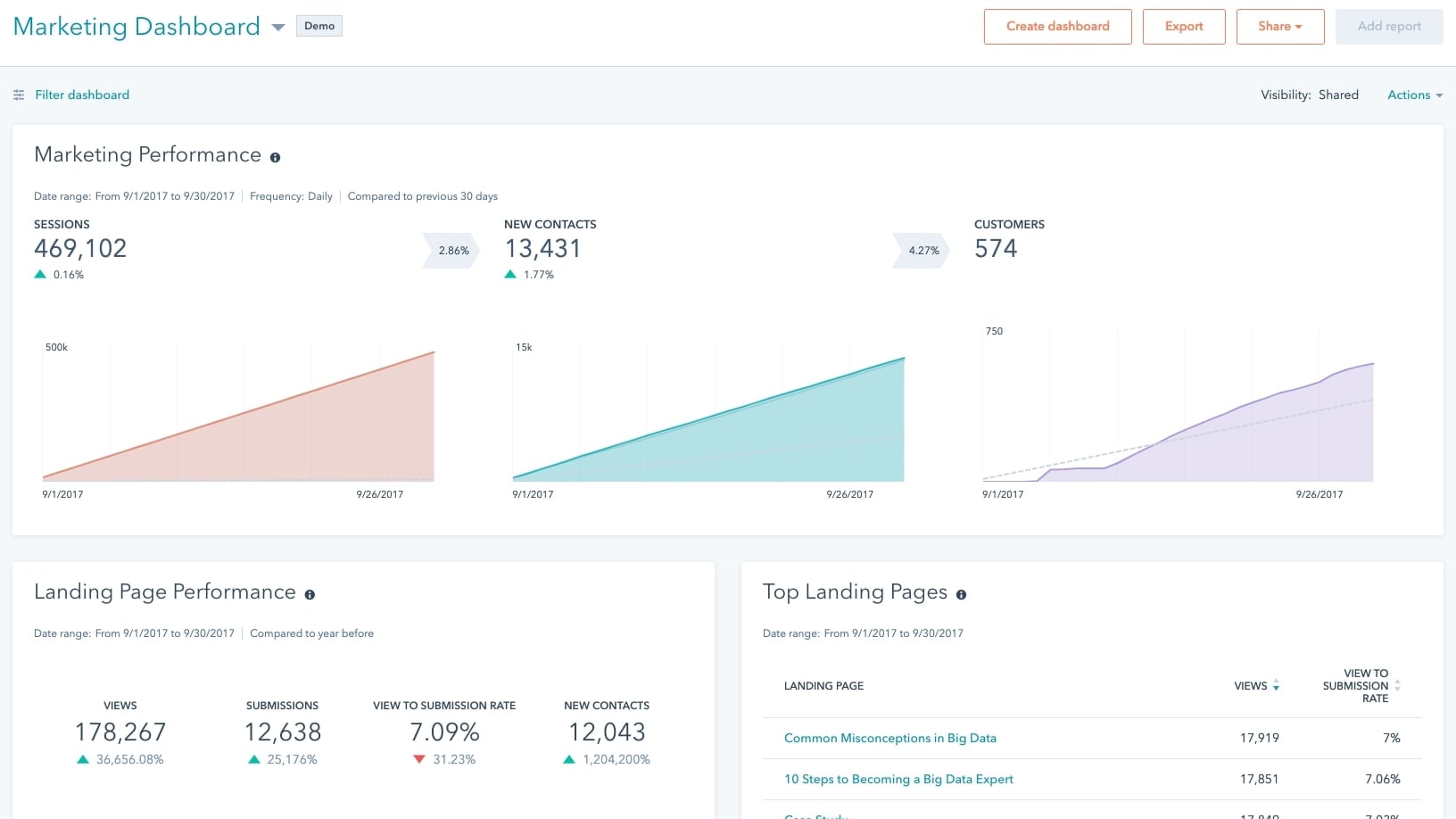
Hubspot's Marketing Dashboard showing Sessions, Contacts and Performance
As for reporting and analytics, HubSpot is the winner. Here's why:
In Pipedrive, you can go to Insights and see your sales pipeline metrics. You can monitor sales cycle length, close ratio of deals, and sales velocity. Plus, you can measure the performance of individual team members.
With Pipedrive you can create multiple dashboards from pre-made reports or custom ones. You can add goals in these reports to see how your results measure up.
Regarding HubSpot, it can show you analytics and reports not only from sales but other aspects of your business.
For analytics, it can show you:
- Sales analytics
- Traffic analytics
- Sales content analytics
- Custom behavioral events
- Contact analytics
When it comes to reports, you can create them from different data sources. For example, you can use contacts, deals, and revenue from the CRM. Or you can use sequences and workflows from automation.
And it doesn't end there. With these data sources, you can choose what kind of visualization you want to see. It can be horizontal or vertical bars, pie charts, funnels, tables, KPIs, etc.
HubSpot has greater coverage on analytics and reporting than Pipedrive. It has templates to visualize key metrics across different business areas with ease.
Pipedrive and HubSpot Are Evenly Matched in Contact and Lead Management
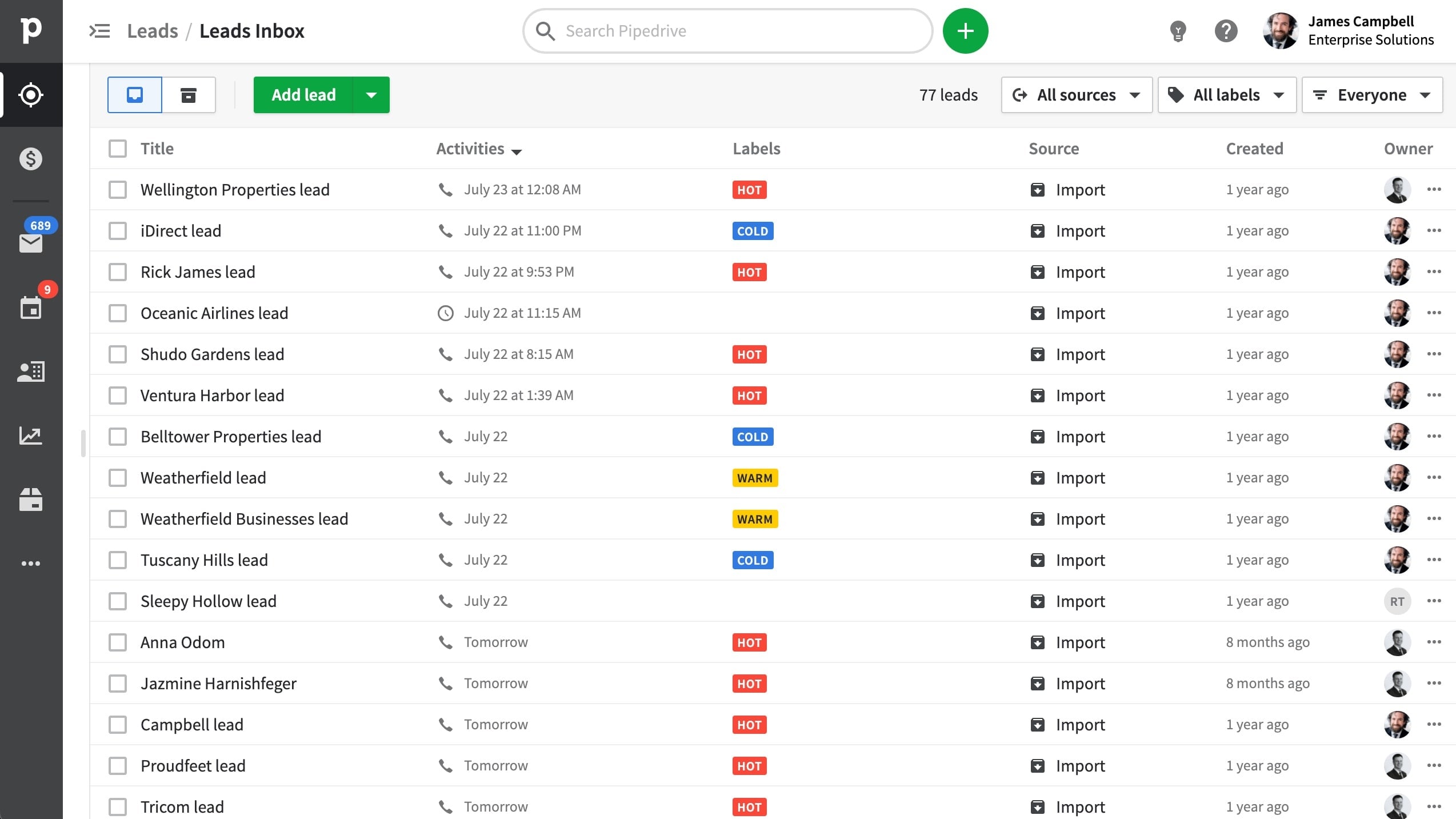
Pipedrive's Lead Inbox Showcasing Labeled Leads
Contact and lead management is one feature in which Pipedrive and HubSpot seem evenly matched. Still, there are a few differences.
In Pipedrive, you can organize your contacts by people or organizations. Plus, you can see your Contacts timeline, which shows you a timeline of activities with that contact. This can help you analyze how long are your life cycles.
Also, thanks to the Lead Inbox, you can capture leads from your website, label them (hot, warm, or cold), and add activities until they become a deal. Plus, you can activate the LeadBooster feature for live chats, chatbots, web forms, and prospector.
The prospector lets you find leads from a database of 400 million profiles.
Now, HubSpot's Contact Management feature is very similar to Pipedrive. But in there, you can create different views to segment your contacts. They can be marketing contacts, sales contacts, or any customizable field.
Also, you can use advanced filters to qualify your contacts easily. These filters can be custom according to the activities of your contacts (conversion, engagement, last contacted, etc).
The Lead Management section in HubSpot allows you to capture leads from emails, chats, website forms, and even Facebook Messenger.
You can also connect to other channels and manage your team's availability. Plus, thanks to snippets of text, you can create shortcuts to your most common responses in emails.
HubSpot Has Added Functionalities for Communication and Collaboration
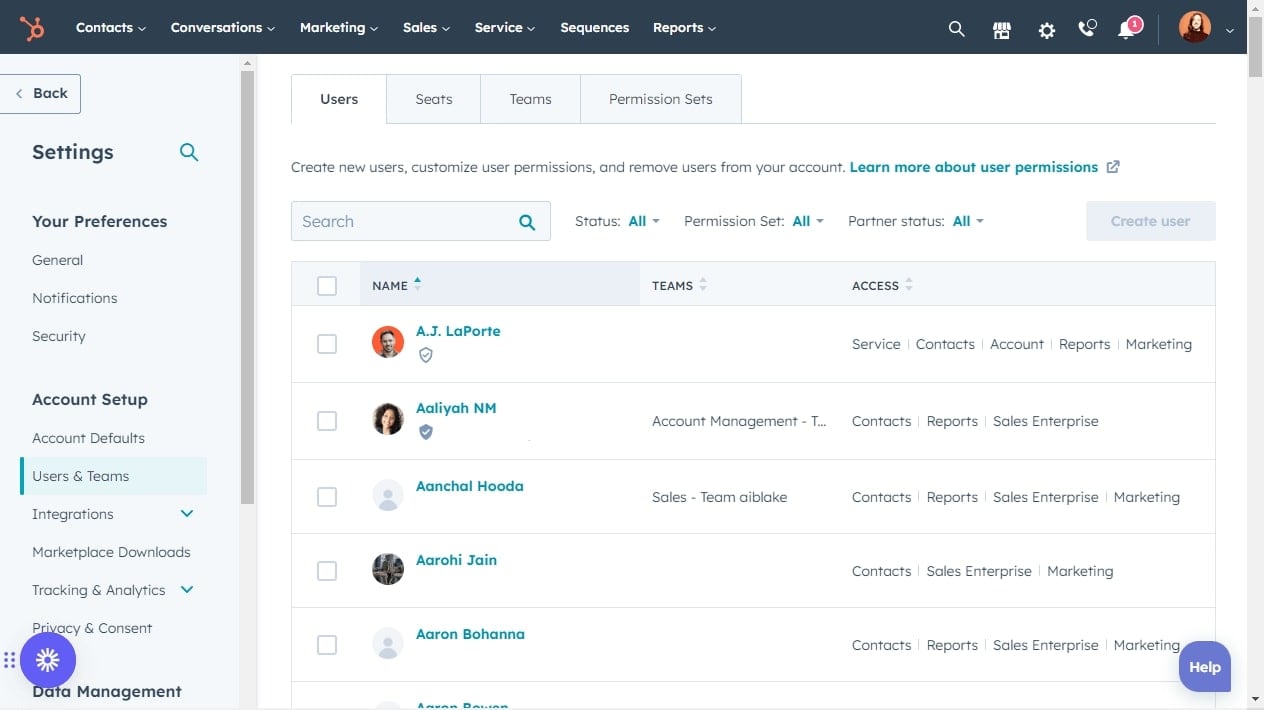
HubSpot's Tiered User Permissions Settings
To smooth collaboration between team members and managers, Pipedrive offers individual permission sets. Each app (deals, projects, and campaigns) has its own permission sets that you can set to admin or regular user.
You can decide who can access global permission and account settings. So Pipedrive shows you an overview of active, invited, and deactivated members as well as their permissions.
HubSpot has comparable permission features to Pipedrive. You can decide who from your team members can access the different HubSpot apps. And you also have an overview of these permissions.
But HubSpot has an added functionality. Thanks to its auditing tools, you can track the activity of different users on tasks. Meaning you can see what user modified a task and the specific action. This can be helpful to identify errors that may be slowing down your sales process.
HubSpot Offers Sales Forecasting on Another Level
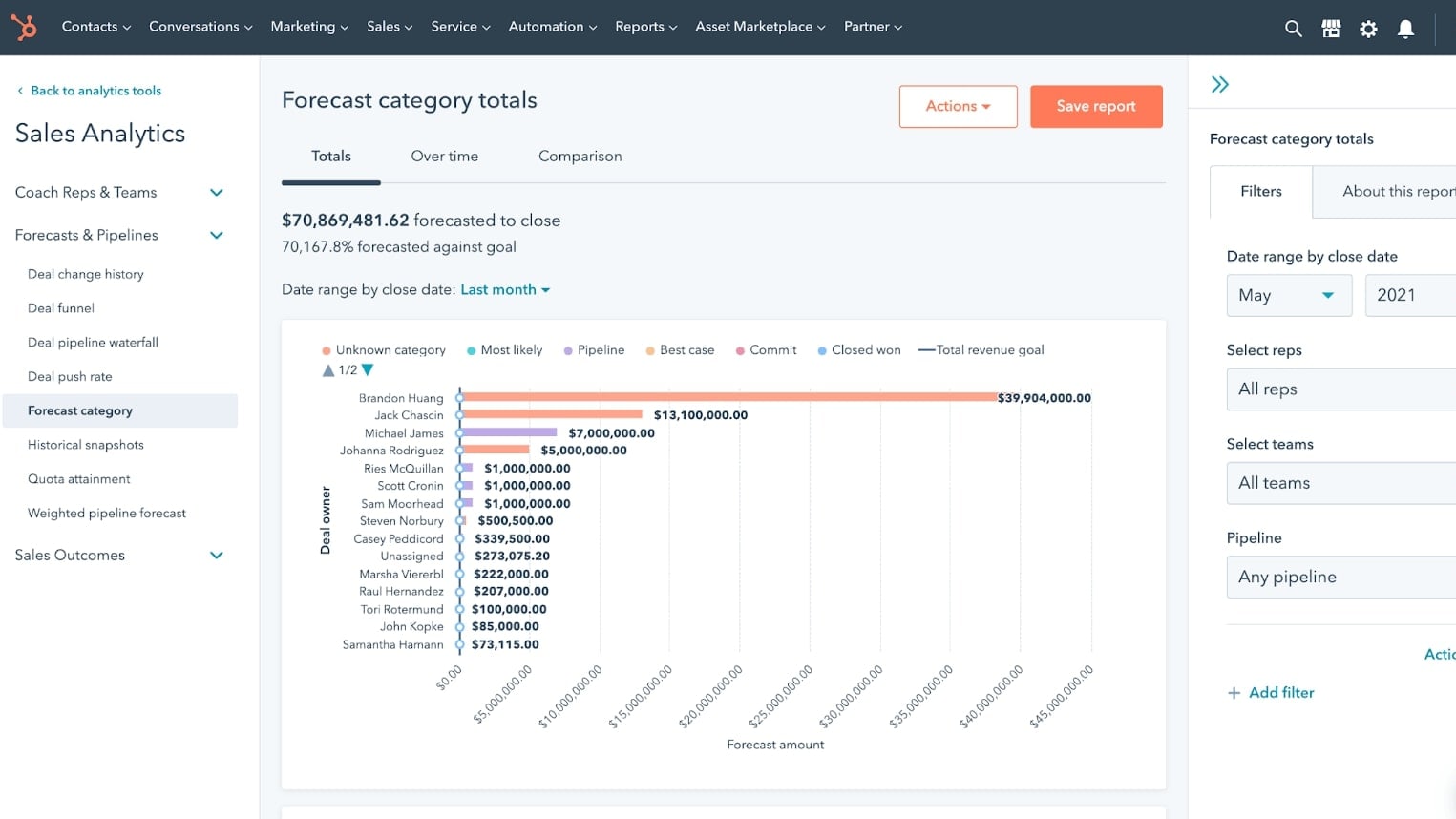
HubSpot's Sales Forecasting with Relative Categories
Pipedrive has a digestible and simple sales forecasting feature. Aside from the functionality on its sales pipeline, if you click on the Forecast section, you'll have a summary of the sales forecast for every month.
This sales forecast feature takes into account the weighted value of each deal and it adds up the value of won deals.
HubSpot does its forecasting on another level. You can keep track of your deals to make sure you're going to meet your quarterly goals. As in Pipedrive, HubSpot uses probabilities to estimate the weighted value of deals while adding the value of won deals.
But what HubSpot does differently is that you can create forecast categories and group deals into these categories. Also, you can analyze the progress of each team member. If one of them is falling behind, you can identify the areas of focus with sales forecasting.
HubSpot Easily Outstands Pipedrive for Integrations
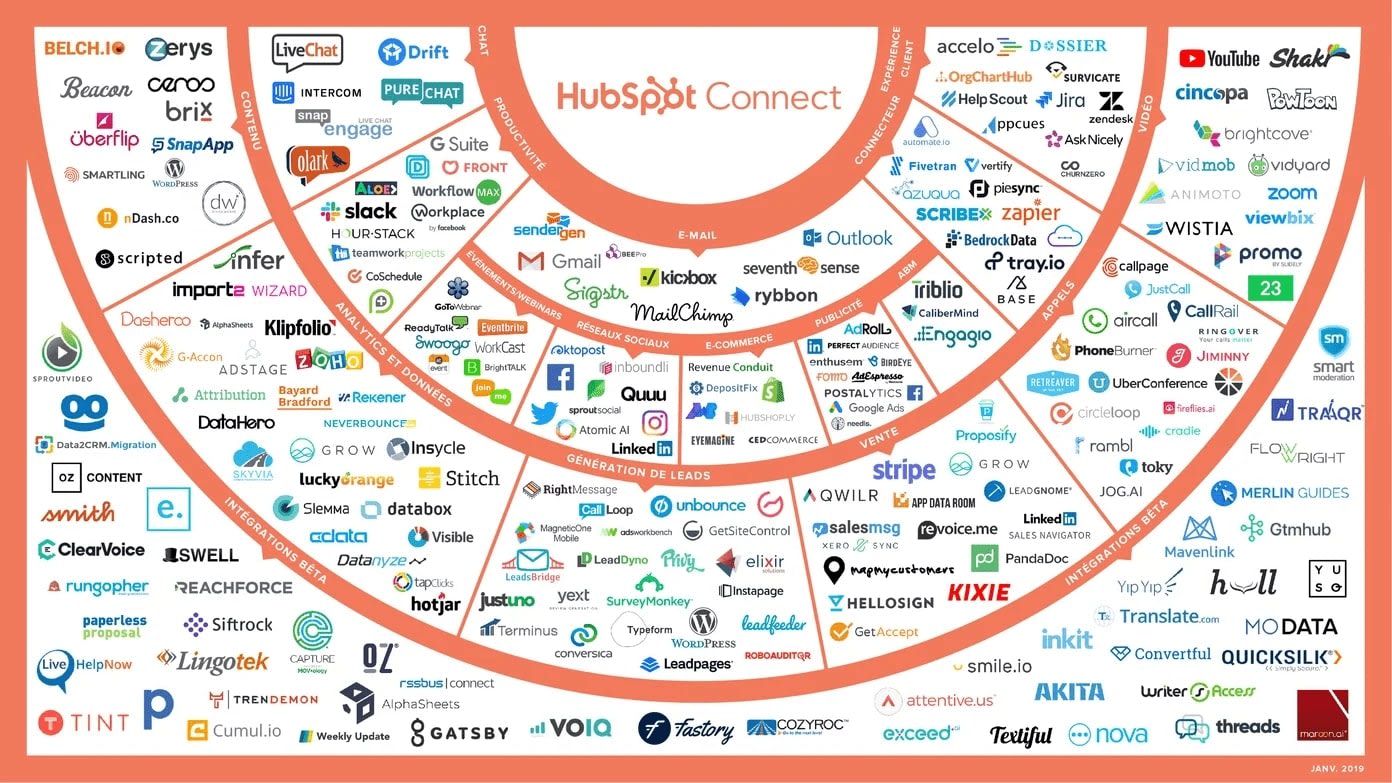
Hubspot's App Marketplace Interface
Pipedrive marketplace lets you connect with apps that will help you in four key areas of sales:
- Capturing and qualifying leads
- Nurturing leads
- Reaching out to clients
- Creating and sending proposals
It has a selection of 350+ integrations, including Zapier, so you can connect more apps and services.
However, HubSpot easily outstands Pipedrive for integrations. Not only does HubSpot offer 1,400+ integrations, but it allows you to integrate with other business apps besides sales like:
- Marketing
- Customer service
- Productivity
- Finance
You can also filter all these apps by pricing structures, languages, if it integrates with other HubSpot apps, etc.
And as if offering a massive library of apps wasn't enough, HubSpot integrates with Zapier. This gives you the chance of integrating with much more apps (given the very little chance that there's one HubSpot can't integrate with already).
Pipedrive Is the Best for Sales Pipeline Management
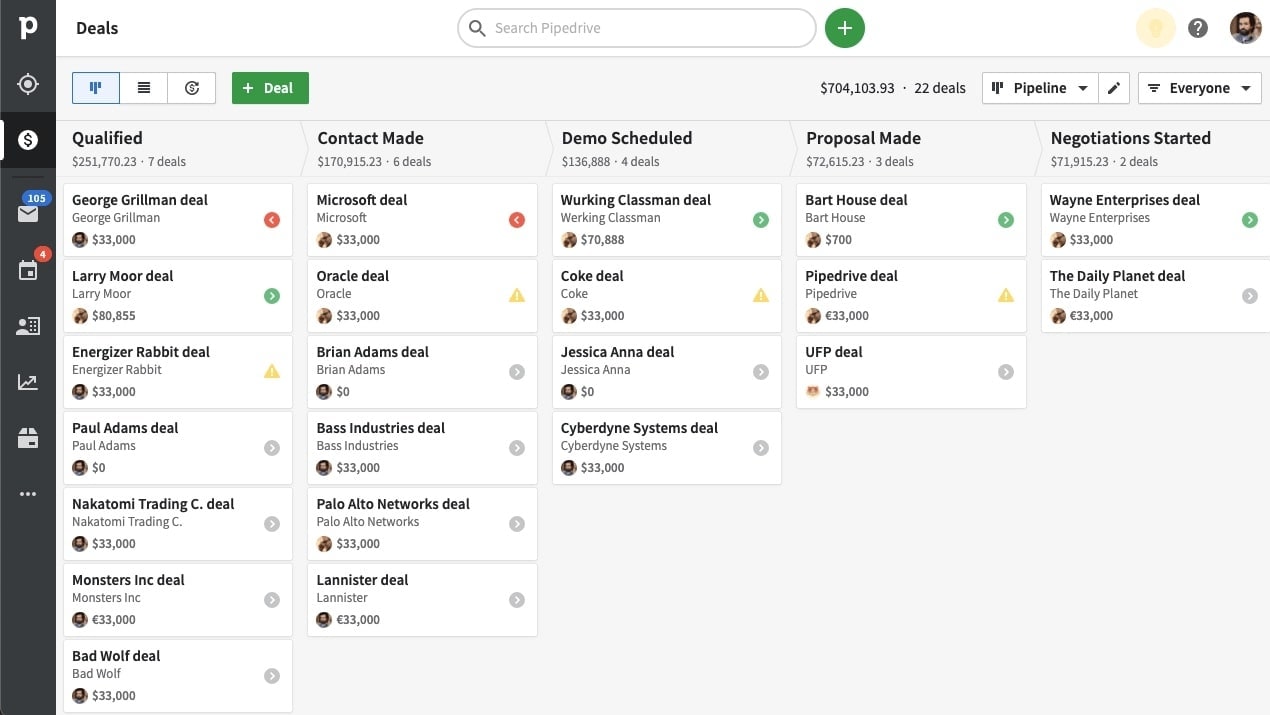
Pipedrive's Pipeline Management with Indicators for Each Deal
As a heads-up, sales pipeline management is where Pipedrive shines. But it's not like HubSpot is completely left behind.
In Pipedrive, the sales pipeline has four different types of indicators for your deals: the arrows or the yellow triangle.
This is what each means:
- Green arrow: A task you have to complete today
- Gray arrow: A task you have to complete in a few days
- Red arrow: A task that's overdue
- Yellow triangle: No activity scheduled
With this simple array, you can identify just by the colors how busy is your pipeline or what deal should you turn your attention to.
Pipedrive includes something called rotting times. The rotting times indicate when a deal has been sitting on your pipeline for too long with no activity or action. This means the deal starts to rot. You can set the number of days for rotting time.
Another plus of using Pipedrive is you can easily drag and drop deals to “lost” or “won” at the bottom of the screen. And if you win a deal, you can turn it into a project and follow the stages of the project as if it was a pipeline.
Also, Pipedrive includes a little sales forecasting feature in the upper right of your screen. It takes into account the probabilities you set for each stage and the value of the deal to give you a weighted value.
In HubSpot, you can identify the priority of your deals with colors (red for high, yellow for medium, and green for low). The Kanban cards include brief notes about the task or activities you have scheduled for the next few days.
Another add-on is that you can see a sales forecasting functionality at the bottom of the screen. It tells you the weighted value of each stage taking probabilities set by you and the value of your deals.
08 Pipedrive vs HubSpot: Which is the best for your business?
Pipedrive is the best tool for you if:
- You're a small to medium size business looking for a solution that meets your budget
- You want CRM software that's easy to set up and provides you with a fast onboarding process
- You need a tool that specializes in sales but offers you some marketing functionalities
- You want a CRM tool with an intuitive user interface where you don't have to click around too much to start working
- You're looking for a tool with simple sales reports that are still fit to send to upper management
 You're a small to medium size business looking for a solution that meets your budget
HubSpot is the best tool for you if:
- You want an all-in-one tool that offers you features for all aspects of your business (sales, customer service, marketing, and CMS)
- You have a complex sales process and value deep insights from robust reporting and analytic tools
- You have large teams and want to use productivity and automation tools to help their day-to-day activities
- You're already using one of HubSpot Hubs, as it can help you manage all your data from one place
- You have a larger budget for software or want a free plan with essential but powerful features
Pipedrive
Used by 2641 members
30% off for 12 months
Save up to $4,644
HubSpot
Used by 2558 members
90% off the Professional and Enterprise plans for 1 year
Save up to $7,000
09 Alternatives to Pipedrive & HubSpot

Slack
Used by 3015 members
25% off new plan purchases
Save up to $9,000

ClickUp
Used by 2909 members
20% off Unlimited and Business plans for 1 year
Save up to $1,000

Monday
Used by 1281 members
First month free
Save up to $80

Zoho
Used by 1131 members
$2,500 in credits for 1 year
Save up to $2,500
10 Promotions on Prospecting and CRM software
Pipedrive and HubSpot are great tools, but Secret offers promo codes with discounts on over 2050+ different SaaS solutions. New deals are added regularly, helping you save money on your online subscriptions. Get access to codes for other Prospecting and CRM software you might want to purchase

Clay coupon code
1,000 free credits + 10% off annual plans
Deal for Zoho
$2,500 in credits for 1 year

Deal for Apollo.io
50% off the annual Basic or Professional plan for 1 year (Up to 5 seats)

Notion promo
6 months free on the Business plan with Unlimited AI

Crunchbase deal
20% off for 1 year

Zendesk deal
6 months free

Waalaxy (ex. ProspectIn) promo
7 days free + 50% off annual plans

Freshworks discount code
14 days free on Freshdesk

Promo code for PhantomBuster
25% off any plan for 12 months

ActiveCampaign promotion
90% off any annual plan for the first year
Start saving on the best SaaS
Secret has already helped tens of thousands of startups save millions on the best SaaS like Microsoft Teams, Google Workspace & many more. Join Secret now to buy software the smart way.