


Every day, your start-up has to work on complex, ambitious, but exciting projects! There are lots of ideas, and lots of sharing. So you need to use an online collaborative tool to centralize discussions and files to maximize your productivity. But which collaborative working tool should you choose?
There are two very well-known software tools in this field: Notion and Confluence. You may be wondering about their features and differences. To help you see things more clearly, we've put together a Notion Vvs Confluence guide. You'll find all the information you need to make your choice.
- 01 Notion vs Confluence: overview
- 02 What's the difference between Notion and Confluence?
- 03 Notion pros and cons
- 04 Confluence pros and cons
- 05 Notion compared to Confluence
- 06 Confluence compared to Notion
- 07 Features comparison
- 08 Notion vs Confluence: Which is the best for your business?
- 09 Alternatives to Notion & Confluence
- 10 Promotions on Collaboration software
Start saving on the best SaaS
Secret has already helped tens of thousands of startups save millions on the best SaaS like Microsoft Teams, Google Workspace & many more. Join Secret now to buy software the smart way.

01 Notion vs Confluence: overview
Notion and Confluence are two prominent contenders in the world of project management and team collaboration, each excelling in different aspects to meet diverse user demands.
Notion is renowned for its versatility, offering a wide range of features that go beyond traditional documentation. It provides flexible note-taking, database creation, task tracking, and collaborative editing. Conversely, Confluence primarily focuses on creating, organizing, and sharing content, making it a top choice for documentation and knowledge sharing within organizations.
Now, let's delve into the Notion vs Confluence comparison to help you make an informed decision when selecting the optimal knowledge management and collaboration solution tailored to your specific requirements.

Positive reviews
Notion's overall score is higher than that of Confluence. Users particularly appreciate the customer service, which is better than that of its counterpart.

Notion
Confluence
Templates and customization
Notion and Confluence allow you to create and customise templates, but Confluence is less flexible than its competitor.
Notion
Confluence
Data visualization
Data visualisation is better on Notion, which offers Kanban boards, Gantt charts and consolidated task lists.
Notion
Confluence
Customer support
Notion's user support service is better than Confluence's, according to the majority of feedback.
Notion
Confluence
Ease of use
The Notion tool has a steep learning curve if you want to master the collaborative platform. Confluence is much more accessible.
Notion
Confluence
Integrations
Notion connects with numerous applications such as Slack and Dropbox. Confluence offers more software integrations, in particular with Jira and Atlassian products.
Notion
Confluence
Collaborative tools
Confluence is an ideal tool for collaboration on complex projects. Notion is more limited and some features are missing.
Notion
Confluence
Note-taking
Both platforms are perfect for taking notes, organising them and sharing them with team members.
Notion
Confluence
Task and project management
Each tool allows you to list tasks and track their progress. However, Confluence really comes into its own when connected to Jira.
Notion
Confluence
Pricing plans
Each tool offers a free plan. You will have to pay to access additional features. Notion, however, charges more.
Notion
Confluence
02 What's the difference between Notion and Confluence?
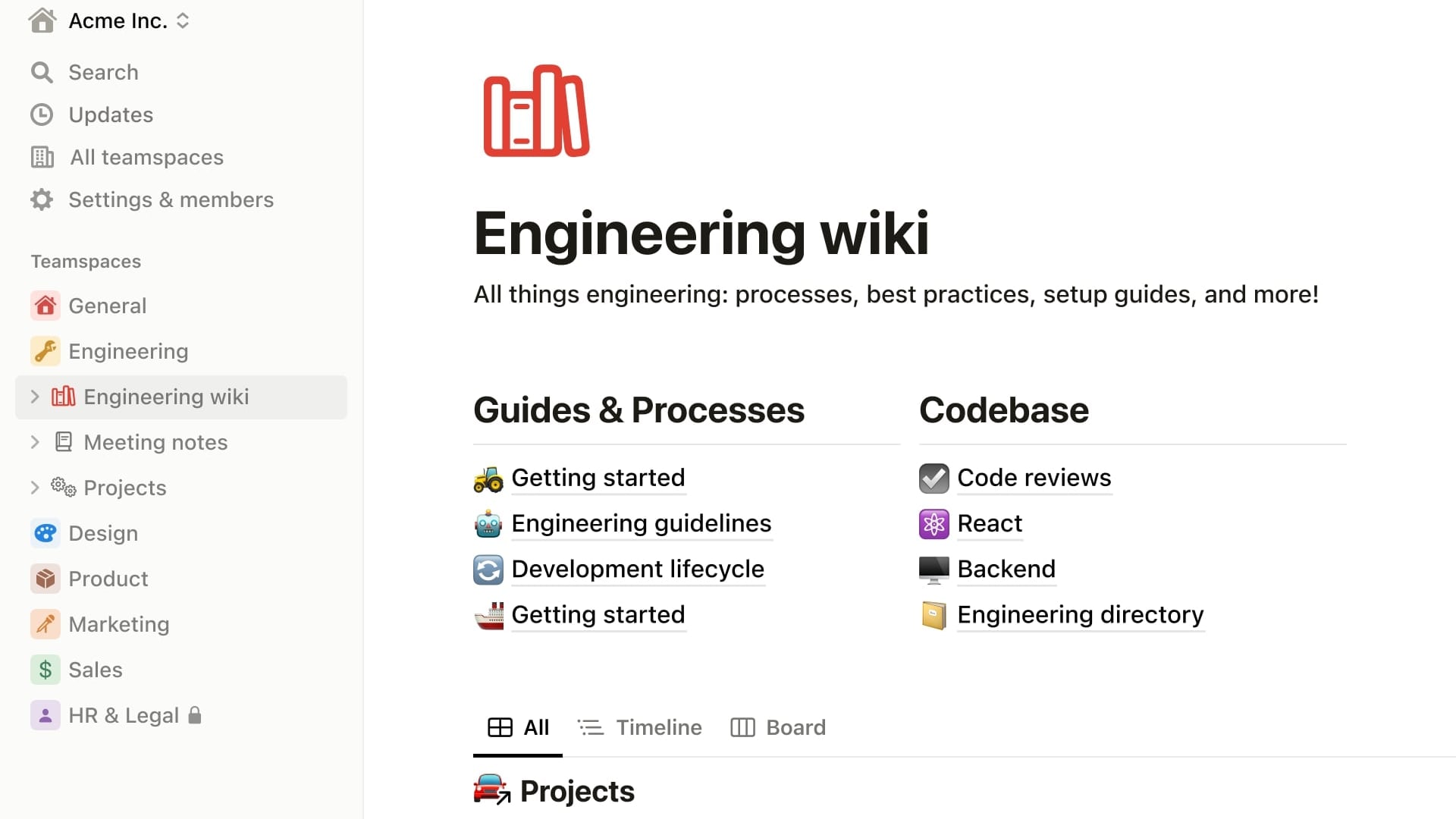
Notion's Customizable Workspace with a Sidebar for Easy Navigation
Notion
Organize teamwork and increase productivity

Confluence's Task Management with Teammate Assignments
Confluence
Confluence is a collaboration software that brings value by helping teams share knowledge, organize work, and collaborate more effectively.
In our opinion, the biggest difference between the Notion and Confluence collaborative tools can be summed up in one word: Atlassian. If you use Atlassian software on a regular basis, then Confluence is highly relevant. If you don't, Notion is more flexible, even if it is more complex to learn. The main difference between the two lies in the situation of your team. If it has a good knowledge of teamwork tools and does not use Atlassian software, opt for Notion. If not, Confluence will be perfect.
Confluence's major difference, which is also its strength, is that it fits in perfectly with the tools offered by Atlassian. So if you're already using Jira, Jira Service Desk or BitBucket, you can make the most of this platform by integrating these different tools. This approach is ideal for optimizing your workflows designed around the software suite offered by Atlassian. Tracking tasks and agile projects or accessing multiple views becomes possible and fast if you connect Confluence with Jira in particular. You can then take advantage of the versatility of Atlassian software to manage complex projects that require advanced reporting and analysis to achieve your objectives.
If you're not an Atlassian user, you don't necessarily have to choose Confluence. With Notion, you'll be able to organize your tasks, integrate databases and get a flexible workspace. Using drag-and-drop, Notion is quick to get to grips with, but takes a long time to master. If you're not dependent on an ecosystem and don't need a great deal of workflow automation, the main difference between Notion and Confluence shouldn't be an argument against adopting Notion.

Notion
Used by 13334 members
6 months free on the Business plan with Unlimited AI
Save up to $12,000

Confluence
Used by 97 members
Free forever for up to 10 users
Save up to $620
03 Notion pros and cons
What are the advantages of Notion?
- Versatility: Notion is incredibly versatile, serving as a note-taking app, database, project management tool, and more, all in one platform. This versatility makes it adaptable to various use cases.

- Collaboration: Notion excels in team collaboration, with real-time editing and commenting features that facilitate seamless teamwork and communication.
- Customization: Users can create custom databases, templates, and workflows, tailoring Notion to their specific needs. This flexibility makes it suitable for personal and professional use.
- Cross-platform: Notion is accessible on web browsers, desktop applications (Windows and macOS), and mobile devices (iOS and Android), ensuring you can access your data from anywhere.
- Knowledge management: Notion is excellent for creating and organizing knowledge bases, making it a valuable tool for documentation and information sharing within teams and organizations.
What are the disadvantages of Notion?
- Learning curve: Notion's wide range of features can be overwhelming for new users, resulting in a steeper learning curve compared to simpler note-taking apps.

- Pricing: While Notion offers a free plan, some advanced features are locked behind a paid subscription, which may not be budget-friendly for all users.
- Offline access: While Notion is accessible offline, it doesn't offer the same robust offline functionality as some other dedicated note-taking apps.
- Performance: Users with very large databases or extensive data may experience performance issues, particularly in terms of speed and responsiveness.
- Limited data export: Exporting data from Notion can be somewhat limited, which may be a concern for users who want to back up their content or migrate to other platforms.
Compare Notion to other tools


Notion vs Slack

Notion vs Monday

xTiles vs Notion

Notion vs Asana

Coda vs Notion

Notion vs Jira
04 Confluence pros and cons
What are the advantages of Confluence?
- Collaboration: Confluence excels in team collaboration and knowledge sharing, offering features like document creation, commenting, and real-time editing, fostering efficient teamwork.
- Integration: It seamlessly integrates with other Atlassian products like Jira, Trello, and Bitbucket, enhancing project management and development workflows.
- Customization: Confluence allows users to create custom templates and pages, enabling teams to tailor the platform to their specific documentation and content needs.
- Powerful search: Its robust search functionality makes finding and retrieving information within Confluence quick and efficient, even in extensive knowledge bases.
- Security: Confluence offers robust security and access control features, allowing administrators to manage user permissions and restrict access to sensitive information.
What are the disadvantages of Confluence?
- Steep learning curve: New users may find Confluence's interface and features complex, resulting in a significant learning curve before becoming proficient.
- Pricing: Confluence's pricing can be relatively high for small teams or startups, especially when combined with other Atlassian products.
- Performance issues: In large instances with extensive content, Confluence may experience performance issues, including slower load times and occasional lag.
- Limited free version: The free version of Confluence, while available, has limited functionality and may not provide all the features needed for comprehensive team collaboration.
- Complexity for small teams: Confluence's feature set can be overwhelming for smaller teams with simpler documentation needs, potentially making it feel like overkill.
Compare Confluence to other tools


Document360 vs Confluence

Slab vs Confluence

Slite vs Confluence
05 Notion compared to Confluence
When comparing Notion and Confluence, Notion stands out for its user-friendly interface and remarkable versatility, making it an attractive choice for individuals and teams seeking comprehensive knowledge management and collaboration solutions. Notion's pricing flexibility, including a free plan and affordable paid tiers, suits startups and small businesses seeking to improve their documentation and collaboration workflows without breaking the bank.
Both Notion and Confluence excel in enhancing team productivity, but the choice between them hinges on your specific requirements. Notion offers a cost-effective solution with a focus on adaptability and customization, making it a preferred option for teams aiming to streamline their knowledge management processes.
Is Notion better than Confluence?
 Is Notion better than Confluence?
Determining whether Notion is better than Confluence depends on your specific knowledge management and collaboration requirements. Notion offers a versatile and user-friendly solution, with an intuitive interface and a wide range of features tailored to diverse needs. It allows you to create custom databases, templates, and collaborative workspaces, making it suitable for a variety of use cases, from personal note-taking to complex team collaboration.
Notion prioritizes customization and ease of use, whereas Confluence is more specialized, particularly well-suited for large organizations with extensive documentation and content-sharing needs.
What is Notion best used for?
Notion shines as a versatile knowledge management and collaboration tool, ideally suited for a diverse range of use cases. Its strengths lie in providing a unified platform for creating, organizing, and sharing information and knowledge.
Whether you're building a personal knowledge base, managing team documentation, or fostering collaboration within your organization, Notion's flexible features, user-friendly interface, and robust collaboration tools make it the ideal choice. Its adaptability and scalability cater to the unique needs of individuals, small teams, and large enterprises, making Notion an indispensable tool for enhancing knowledge management and streamlining collaboration across various domains.
Can Notion replace Confluence?
Notion presents a compelling alternative to Confluence for teams seeking comprehensive knowledge management and collaboration solutions. While Confluence is well-suited for extensive documentation and content-sharing needs, Notion's versatility and customization options cater to a wider array of use cases and industries.
With Notion, you can create customized databases, organize information effectively, and collaborate seamlessly. Its user-friendly interface and diverse feature set make it a suitable choice for teams aiming to enhance knowledge management without sacrificing adaptability. Whether you're in need of extensive documentation capabilities or seek a more versatile knowledge management tool, Notion provides a robust option that can potentially replace Confluence while accommodating a broader range of organizational requirements.
Is Notion cheaper than Confluence?
When comparing the pricing of Notion and Confluence, there are notable differences to take into account. Notion’s pricing includes a free plan with robust features, making it an attractive option for small teams and cost-conscious users. In contrast, Confluence's pricing structure tends to be higher, particularly for larger teams and enterprises, which can be a significant factor in the decision-making process.
While both platforms offer advanced collaboration and knowledge management features, Notion provides a cost-effective entry point and competitive pricing tiers, potentially making it a more budget-friendly choice for teams seeking efficient knowledge management without exceeding their budget constraints.
Is there a better Collaboration software than Notion?
While Notion is a versatile knowledge management and collaboration tool, it's crucial to consider whether there might be a better-fitting software for your specific needs.
Several notable alternatives to Notion in the knowledge management and collaboration space include Confluence, Evernote, OneNote, and ClickUp.
The choice of software depends on factors such as the scale of your knowledge management needs, team collaboration preferences, and integration requirements. While Notion offers extensive customization and versatility, other tools may excel in particular aspects or offer a more streamlined approach.

Notion
Organize teamwork and increase productivity
6 months free on the Business plan with Unlimited AI
Save up to $12,000
06 Confluence compared to Notion
Confluence stands out with its specialization in documentation and knowledge management, making it a top choice for organizations focused on extensive content creation and sharing. Confluence's pricing structure, though more oriented toward enterprise-level usage, offers scalability and features that cater to various collaboration needs.
While both Confluence and Notion excel in knowledge management and collaboration, the choice between the two depends on your specific requirements. Confluence is the preferred option for organizations seeking robust documentation capabilities, content organization, and extensive content-sharing features. In contrast, Notion provides a versatile and customizable platform suitable for a broader range of knowledge management and collaboration needs, making it ideal for teams with diverse requirements.
Is Confluence better than Notion?
The evaluation of whether Confluence is better than Notion depends on your organization's knowledge management and collaboration requirements. Confluence excels in extensive documentation capabilities, offering robust features for content creation, organization, and sharing. It is particularly well-suited for large enterprises with complex documentation needs and a focus on structured content.
Conversely, Notion provides a highly flexible and customizable platform suitable for a broad range of knowledge management and collaboration use cases. It offers a user-friendly interface and a versatile toolkit for creating databases, notes, and collaborative workspaces. Notion's adaptability makes it attractive to organizations seeking a more tailored solution for their unique knowledge management and collaboration needs.
What is Confluence best used for?
Confluence excels as a specialized tool designed primarily for documentation, knowledge management, and content collaboration. It is an ideal choice for organizations and teams seeking to create, organize, and share extensive content, such as documents, wikis, manuals, and knowledge bases.
Confluence's strengths lie in its robust set of features for content creation, version control, and content organization. It is invaluable for teams requiring detailed documentation workflows, collaborative editing, and comprehensive content management reporting. Its specialization in documentation and knowledge management makes it an essential tool for businesses aiming to centralize their content, streamline documentation processes, and enhance knowledge sharing and collaboration across the organization.
Can Confluence replace Notion?
Confluence can potentially replace Notion, depending on the specific knowledge management and collaboration requirements of your organization. Confluence excels in comprehensive documentation, content creation, and knowledge sharing, making it a preferred choice for organizations with extensive documentation needs.
If your primary focus is on centralizing content, creating wikis, manuals, and knowledge bases, and enhancing knowledge sharing and collaboration across your organization, Confluence's specialization in these areas may make it a suitable replacement for Notion. However, the decision should align with your organization's specific knowledge management goals and the complexity of your collaboration workflows, as Notion offers a highly adaptable and versatile platform that caters to a broader range of knowledge management and collaboration needs.
Is Confluence cheaper than Notion?
Comparing the cost of Confluence to Notion reveals notable differences in pricing structures. Confluence’s pricing model may be perceived as higher, especially for larger teams and organizations, with pricing plans designed to cater to enterprise-level needs.
On the other hand, Notion provides a more cost-effective alternative, including a free plan with robust features, which makes it accessible to startups, small businesses, and individuals. Notion's paid plans are competitively priced, offering advanced capabilities without imposing substantial budget constraints.
Is there a better Collaboration software than Confluence?
Confluence is a robust tool for documentation and knowledge management, yet it's essential to explore whether there might be a more suitable software for your specific requirements.
Some notable alternatives to Confluence in the knowledge management and collaboration space include Notion, Evernote, OneNote, and Google Workspace.
The choice of knowledge management and collaboration software depends on factors such as the scale of your documentation needs, team collaboration preferences, and integration requirements. While Confluence excels in structured content creation and sharing, other tools may offer a more versatile or user-friendly approach to knowledge management.

Confluence
Teamwork made easy
Free forever for up to 10 users
Save up to $620
07 Features comparison
Notion and Confluence are Equally Good at Maintaining a Knowledge Base

Notion offers a versatile platform for building knowledge bases tailored to various use cases.
Notion and Confluence both excel in knowledge base management, enabling teams to centralize critical information, documents, procedures, tutorials, and best practices for easy access and updates.
Notion offers a versatile platform for building knowledge bases tailored to various use cases. Its user-friendly interface and customizable templates make it easy to create and organize content. For example, you can build a comprehensive onboarding knowledge base with pages dedicated to company policies, training materials, and FAQs.
Confluence, with its strong emphasis on documentation and content organization, is an ideal choice for creating extensive knowledge bases. Its hierarchical structure, powerful search capabilities, and intuitive content linking simplify the organization of information. For instance, teams can build knowledge bases with detailed articles, how-to guides, and troubleshooting documentation.
Notion's Task Database Outperforms Confluence's Project Management Tools

This task-centric approach streamlines work processes, making Notion a preferred choice for teams seeking an accessible and efficient project management solution.
When it comes to project management, Notion stands out as a more user-friendly and task-centric solution compared to Confluence.
Notion's project management capabilities are designed with a focus on user-friendliness and efficiency. It offers an integrated task database that simplifies task tracking, deadline management, and teamwork collaboration. For example, teams can create comprehensive task lists, assign responsibilities, set due dates, and collaborate on projects within a single, intuitive platform. This task-centric approach streamlines work processes, making Notion a preferred choice for teams seeking an accessible and efficient project management solution.
While Confluence offers robust project management tools, it may not be as user-friendly and task-oriented as Notion. Confluence's strengths lie in content organization and knowledge management, which can sometimes lead to a steeper learning curve for users primarily seeking project management features.
Confluence Excels Ahead of Notion for User-Friendliness

Confluence's intuitive interface simplifies the process of creating, organizing, and sharing content.
In the realm of ease-of-use, Confluence emerges as the preferred choice, offering a user-friendly experience that distinguishes it from its competitors.
Confluence's intuitive interface simplifies the process of creating, organizing, and sharing content. Its clean and organized layout ensures that users can navigate seamlessly, whether they are creating documentation, collaborating on projects, or building knowledge bases. For example, Confluence's drag-and-drop editor allows for effortless content creation, while the robust search functionality ensures quick access to relevant information.
While Notion is versatile, it can be more complex to navigate, especially for new users. Its flexibility sometimes comes at the cost of a steeper learning curve. For instance, creating intricate databases or customized templates may require more time and familiarity with the platform.
Confluence’s Integration Library is More Extensive Compared to Notion’s
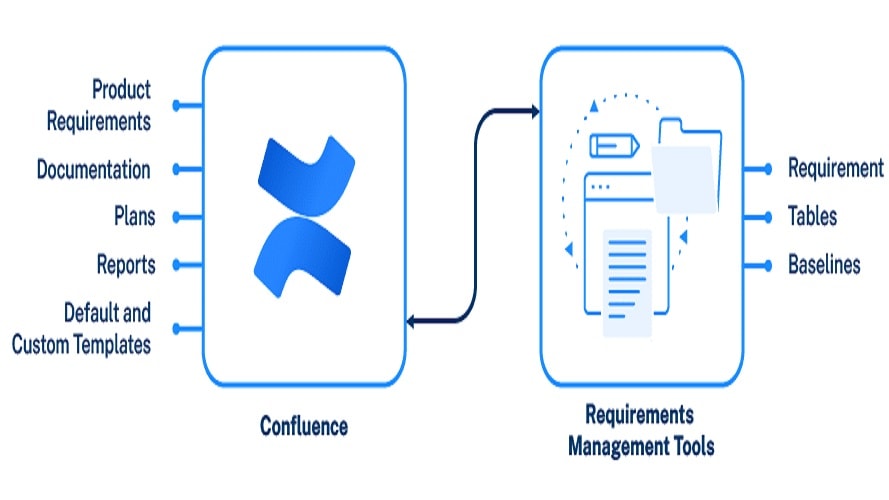
Confluence exhibits a distinct advantage over Notion, offering a broader range of native and third-party integrations that enhance cross-platform productivity.
When evaluating integration capabilities, Confluence exhibits a distinct advantage over Notion, offering a broader range of native and third-party integrations that enhance cross-platform productivity.
Confluence's strength lies in its seamless integrations, especially with other Atlassian products like Jira, Bitbucket, and Trello. This native connectivity fosters efficient collaboration and project management within the Atlassian ecosystem. Additionally, Confluence integrates smoothly with various third-party productivity tools, communication applications, and others such as Google Drive and Slack, allowing users to consolidate their work processes. For instance, teams can seamlessly embed Google Drive documents or collaborate on Slack directly from Confluence pages.
While Notion supports a selection of integrations, including Google Drive, Figma, and Embed.ly, its list is not as extensive as Confluence's. Notion's integration ecosystem is evolving, with its API in its early stages, indicating potential for future expansion.
Confluence is Better at Feedback Management than Notion
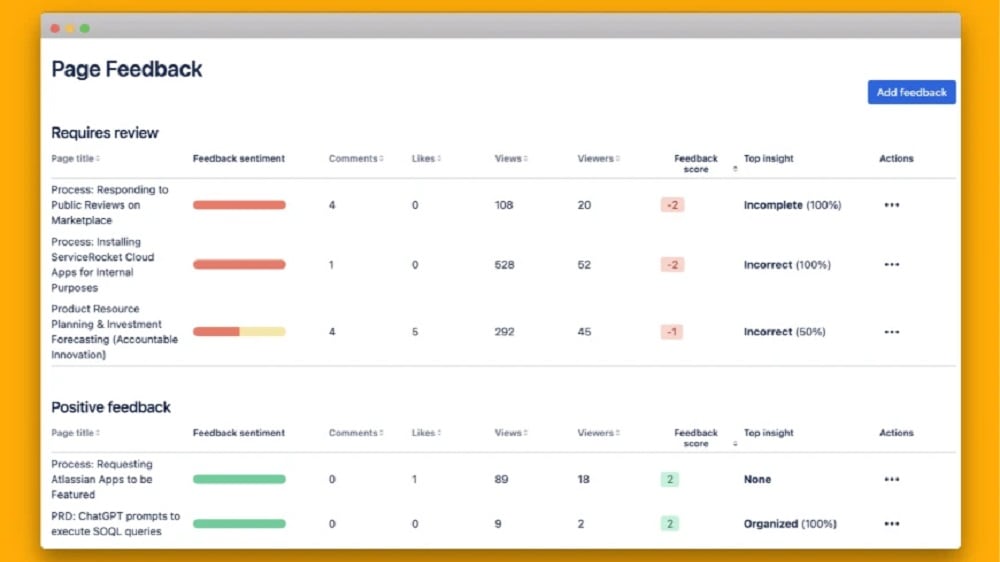
Confluence's project management capabilities are complemented by a robust feedback management system.
When examining project management and feedback systems, Confluence offers a unique advantage over Notion with its comprehensive feedback management system.
Notion's project management features enable users to manage tasks, assign responsibilities, and monitor project progress efficiently. While it excels in task management and collaboration, it lacks a dedicated feedback management system. Users may need to resort to external tools or manual processes for collecting and organizing project-related feedback.
Confluence's project management capabilities are complemented by a robust feedback management system. This system allows for real-time feedback from team members, clients, or users, facilitating the tracking of suggestions, bug reports, and improvement ideas. For instance, users can create dedicated feedback spaces where stakeholders can provide input directly, streamlining the feedback loop and promoting continuous project enhancement.
Notion Excels at Providing Templates Compared to Confluence

Notion's extensive library of templates covers a diverse range of use cases, from project management to personal note-taking and knowledge base creation.
In the realm of templates, Notion takes a clear lead over Confluence, offering a wide array of expert-crafted templates that can significantly enhance productivity.
Notion's extensive library of templates covers a diverse range of use cases, from project management to personal note-taking and knowledge base creation. These ready-to-use layouts serve as valuable starting points for various tasks and projects. For example, you can find templates for meeting agendas, product roadmaps, and content calendars. Notion's templates simplify the process of organizing information and collaborating with team members, making it an invaluable resource for boosting productivity.
While Confluence offers robust documentation and collaboration features, it doesn't provide a similar template-rich environment as Notion. Users may need to create templates from scratch or rely on third-party sources for template collections, potentially requiring more effort and time to set up documentation and collaborative projects.
Confluence Outshines Notion for Customizable Branding

Confluence's emphasis on branding customization enables users to tailor the platform's look and feel to match their company's brand colors and logo.
When it comes to branding customization, Confluence offers a distinctive advantage over Notion, providing businesses with the tools to align the platform's appearance with their brand identity.
Confluence's emphasis on branding customization enables users to tailor the platform's look and feel to match their company's brand colors and logo. This level of customization promotes a seamless and personalized user experience, reinforcing brand consistency. For example, businesses can incorporate their logo, select brand-specific color schemes, and even adjust the overall interface to reflect their corporate identity. Confluence's branding flexibility ensures that every interaction with the platform reinforces the brand's image.
Notion, while versatile in many aspects, lacks the same level of branding customization offered by Confluence. Users have limited options to modify the platform's appearance to align with their brand identity. This limitation may result in a less personalized experience for users seeking a cohesive brand presentation.
08 Notion vs Confluence: Which is the best for your business?
Notion is the best tool for you if:
- You crave versatility; it seamlessly handles notes, project management, databases, wikis, and more in a unified interface
- Collaboration is paramount, with real-time editing and task tracking features, perfect for teams working remotely or together
- You prefer a clean, minimalist design for a distraction-free work environment, enhancing productivity and focus
- Customization is essential; Notion allows you to build your unique workflow, tailored to your specific needs and preferences
- You seek cross-platform accessibility; it provides a consistent experience on web, desktop, and mobile, promoting seamless productivity
 You crave versatility; it seamlessly handles notes, project management, databases, wikis, and more in a unified interface
Confluence is the best tool for you if:
- You need robust team collaboration, offering collaborative editing, file sharing, and task tracking for streamlined project management
- Scalability is crucial; it's ideal for both small teams and large organizations, accommodating growth seamlessly
- Your work involves extensive documentation; Confluence's wiki-style pages are perfect for creating and organizing comprehensive documentation
- Integration is a priority; it boasts a wide range of integrations with popular tools like Jira, Slack, and Trello, enhancing workflow efficiency
- You require powerful knowledge management; Confluence's intuitive structure and search features simplify storing, finding, and sharing information effectively
Notion
Used by 13334 members
6 months free on the Business plan with Unlimited AI
Save up to $12,000
Confluence
Used by 97 members
Free forever for up to 10 users
Save up to $620
09 Alternatives to Notion & Confluence

Airtable
Used by 7185 members
$1,000 in credits for 1 year
Save up to $1,000

Slack
Used by 3015 members
25% off new plan purchases
Save up to $9,000

ClickUp
Used by 2909 members
20% off Unlimited and Business plans for 1 year
Save up to $1,000

Zoom Meetings
Used by 1666 members
$20 off the annual One Pro plan for US and European companies
Save up to $20
10 Promotions on Collaboration software
Notion and Confluence are great tools, but Secret offers promo codes with discounts on over 2050+ different SaaS solutions. New deals are added regularly, helping you save money on your online subscriptions. Get access to codes for other Collaboration software you might want to purchase

Promo codes for Google Workspace
20% off Plus plans for 1 year
Promo code for Airtable
$1,000 in credits for 1 year
Code for Slack
25% off new plan purchases

Credits for Miro
$1,000 in credits (lifetime validity)

Credits for Monday
First month free

Discount for Asana
75% off the annual Starter and Advanced plans for 1 year
ClickUp promo
20% off Unlimited and Business plans for 1 year

Discount for xTiles
20% off monthly or annual plans

Deal for Google Drive
20% off Plus plans for 1 year
Zoom Meetings coupon code 2025
$20 off the annual One Pro plan for US and European companies
Start saving on the best SaaS
Secret has already helped tens of thousands of startups save millions on the best SaaS like Microsoft Teams, Google Workspace & many more. Join Secret now to buy software the smart way.