


There’s an overwhelming choice of AI-powered development tools on the market today. Ironically, searching for the right one can consume valuable time better spent building your next big idea. Lovable and Bolt are two standout platforms in this space, designed to help you bring full-stack applications to life with the power of AI — without the usual hassle of local setup or manual coding.
To help you decide which is best for your specific needs, we’ve prepared a comprehensive comparison. We’ll explore Lovable’s and Bolt’s main features, use cases, pros and cons, and pricing so you can make an informed choice for your next project. Let’s dive in!
- 01 Lovable vs bolt.new: overview
- 02 What's the difference between Lovable and bolt.new?
- 03 Lovable pros and cons
- 04 bolt.new pros and cons
- 05 Lovable compared to bolt.new
- 06 Features comparison
- 07 Lovable vs bolt.new: Which is the best for your business?
- 08 Alternatives to Lovable & bolt.new
- 09 Promotions on Application Development software
Start saving on the best SaaS
Secret has already helped tens of thousands of startups save millions on the best SaaS like Microsoft Teams, Google Workspace & many more. Join Secret now to buy software the smart way.

01 Lovable vs bolt.new: overview
Lovable and Bolt are emerging leaders in AI-powered development tools, each offering distinct approaches to building full-stack applications with speed and efficiency.
Lovable excels as an AI-driven development partner that turns your ideas into functional apps within seconds. It’s designed for users who want to rapidly create internal tools, MVPs, websites, and B2B applications — all without writing a single line of code. Bolt, by contrast, focuses on giving developers a seamless, browser-based environment to prompt, edit, and deploy both web and mobile apps in real time.
Now, let’s explore the Lovable vs Bolt comparison in depth to help you determine which AI development tool aligns better with your project goals and technical workflow.

Positive reviews
Lovable gets high marks from early adopters for saving hours on building internal tools and prototypes. Bolt’s users appreciate the freedom to code and deploy directly in the browser, which is a big win for remote teams. Both platforms are well-liked but still new, so users expect fast improvements.

Lovable
bolt.new
Ease of use
Lovable is a favorite for non-technical founders — you describe what you want, and it spins up a working app in seconds. Bolt is powerful but has a steeper learning curve if you want to edit generated code line by line or manage more complex builds in-browser.
Lovable
bolt.new
Integrations
Lovable connects nicely with popular data tools like Airtable, Notion, and Slack, making it handy for automating internal workflows. Bolt has strong ties to dev tools like GitHub, Vercel, and Firebase — great for teams that want CI/CD or cloud deploys straight from the browser. Both work well with Zapier for extra automation.
Lovable
bolt.new
Collaboration
Lovable allows teams to collaborate by sharing and editing app ideas together, but Bolt goes further with real-time browser-based coding, enabling multiple developers to work on the same project simultaneously — ideal for remote teams.
Lovable
bolt.new
Version control
Bolt integrates deeply with GitHub for version control, making it easy to track changes and roll back deployments. Lovable currently offers basic versioning but lacks the robust Git-based branching that some dev teams prefer.
Lovable
bolt.new
Customization
Lovable shines for its prompt-driven flexibility — users can fine-tune app logic and UI with minimal manual coding. Bolt allows customization too, but is geared more towards editing AI-generated code than building custom flows entirely from scratch.
Lovable
bolt.new
Deployment
Bolt’s one-click browser-based deploy is a standout feature — you can test and launch web or mobile apps instantly. Lovable handles deployment well, but some advanced deployment settings may require exporting to your own cloud infrastructure.
Lovable
bolt.new
Scalability
Both platforms are suitable for scaling prototypes into production apps. Lovable is ideal for quickly iterating MVPs and internal tools, while Bolt supports scaling through robust cloud integrations and CI/CD pipelines.
Lovable
bolt.new
Pricing plans
Lovable’s pricing is straightforward — you can try it free, then upgrade for more build credits or team seats. Bolt is similar with a generous free plan, then flexible monthly or usage-based pricing for bigger deployments. Both are pretty fair for startups and solo builders.
Lovable
bolt.new
Customer support
Lovable’s team is known for jumping in quickly via live chat and Discord groups, especially when people run into app deployment quirks. Bolt leans on a well-organized knowledge base and a supportive dev community for faster answers, though direct help is available too.
Lovable
bolt.new
02 What's the difference between Lovable and bolt.new?

Lovable’s AI-Powered App Builder with Supabase Integration
Lovable
Build apps in seconds, not weeks

Bolt’s In-Browser IDE with Supabase Integration and Real-Time Code Editing
bolt.new
Bolt is an AI-powered browser-based development platform that lets you prompt, run, edit, and deploy full-stack web and mobile applications instantly—no local setup required.
Lovable and Bolt are two promising AI-powered development platforms, but they differ in how they balance speed, flexibility, and control. Both aim to save you from repetitive setup and manual coding — yet they’re built for slightly different users and workflows.
Lovable works almost like an on-demand full-stack engineer. You feed it an idea in plain language — like “I need an internal tool to track orders” — and Lovable instantly generates a working app with frontend, backend, and database connections. It’s designed for founders, PMs, or non-technical teams who want a functional prototype or internal tool up and running without ever touching a terminal. Its main draw is simplicity and speed: you don’t have to worry about environment setup, frameworks, or deployment pipelines because Lovable handles that in the background.
Bolt, on the other hand, keeps you closer to the code. It’s a browser-based development platform where you can prompt, run, edit, and deploy apps in real time. Unlike Lovable’s more guided approach, Bolt gives developers raw access to the AI-generated code. You can edit it line by line, manage dependencies, and push changes straight to GitHub — all without leaving your browser. This appeals to devs who want to experiment, test ideas collaboratively, or handle more complex production builds with version control and CI/CD baked in.
When it comes to integrations, Lovable focuses on easy connections to popular business tools like Airtable, Notion, and Slack — great for automating internal workflows. Bolt leans more into dev-focused services like GitHub, Vercel, and cloud databases. For deployment, Bolt’s instant push-to-cloud feature is smoother for teams managing live updates.
If you want a hands-off AI that does the heavy lifting for MVPs, Lovable shines. If you prefer a flexible coding sandbox you can control and scale with your team, Bolt is likely the better fit.

Lovable
Build apps in seconds, not weeks
15% off annual Pro and Business plans
Save up to $500
03 Lovable pros and cons
What are the advantages of Lovable?
- Ultra-fast idea-to-app build: Lovable can turn a simple prompt into a fully functional app within seconds, saving founders and product teams countless hours on setup and boilerplate code.

- No coding required: Non-technical users can generate internal tools, websites, or B2B apps without needing to write or debug complex code themselves.
- Flexible for different use cases: It’s versatile enough for MVPs, prototypes, and internal dashboards — making it a solid choice for startups and lean teams experimenting with new ideas.
- Easy integrations: Lovable connects with popular tools like Airtable, Notion, and Slack, so you can plug your AI-built app into your existing workflows.
- Clear and simple UI: The interface is beginner-friendly, with step-by-step flows that keep you from getting lost — especially helpful if you’re new to AI development platforms.
What are the disadvantages of Lovable?
- Limited deep customization: If you need highly specific business logic or unique designs, you may run into limitations unless you export the code and refine it manually.

- Basic version control: Lovable’s versioning tools are not as robust as traditional Git workflows, so developers wanting branching and rollbacks might need to integrate external tools.
- Less appealing for hardcore developers: Experienced devs might find Lovable too “black box” since you’re more reliant on AI-generated code than hands-on editing.
- Potential vendor lock-in: Relying heavily on the platform’s hosting or build system could make migration more work down the road if you outgrow its capabilities.
- Still maturing: As a newer platform, Lovable is evolving quickly, but some features — like advanced deployment options or enterprise security controls — may feel early-stage compared to mature dev tools.
04 bolt.new pros and cons
What are the advantages of bolt.new?
- Fully browser-based development: You can prompt, write, edit, and deploy full-stack apps directly in your browser — no local environment or complex setup required, which is a big plus for remote or mobile work.
- Deep version control integration: Bolt connects seamlessly with GitHub, making it easy to manage commits, branches, and rollbacks. For teams that rely on Git workflows, this is a huge advantage over more “black box” AI tools.
- Real-time team collaboration: Multiple developers can work on the same project simultaneously, seeing changes instantly. This “multiplayer coding” experience is ideal for distributed teams or hackathons.
- Instant deploys: Bolt’s one-click deploy feature lets you push updates to the cloud in seconds — no manual server config or DevOps pipeline needed for simple projects.
- Developer flexibility: Unlike AI tools that hide the code, Bolt gives you direct access to the generated codebase. You can edit, refactor, or build on top of it however you like, which appeals to devs who want to stay in control.
What are the disadvantages of bolt.new?
- Steeper learning curve: While Bolt is powerful, it’s not as beginner-friendly as prompt-only tools like Lovable — you still need to understand how to read, edit, and manage code.
- Limited for non-technical users: Non-dev founders or PMs might find Bolt overwhelming without technical guidance, since much of the value comes from hands-on coding.
- Can generate messy code: Like many AI dev tools, Bolt’s output sometimes needs manual clean-up. If you’re picky about structure or performance, be ready to tweak.
- Browser dependence: Relying entirely on a browser-based IDE can be tricky with large files or complex builds — you might miss the stability and speed of a local setup.
- Fewer “plug-and-play” integrations for business tools: Bolt focuses more on dev stack integrations (GitHub, Vercel) than no-code business app connectors. Teams wanting easy CRM or marketing tool tie-ins might need extra steps.
05 Lovable compared to bolt.new
Lovable and Bolt both speed up app development with AI, but they serve different kinds of builders. Lovable is perfect for non-technical founders or teams who want to turn ideas into functional apps almost instantly, with minimal setup and an intuitive prompt-based flow.
Bolt, in contrast, is geared toward developers who want more hands-on control — its browser-based environment lets you generate, edit, and deploy code in real time, with tight GitHub integration and real-time collaboration. If you want fast, no-code builds for internal tools or MVPs, Lovable shines; if you prefer deep customization and direct code access, Bolt is stronger.
Is Lovable better than bolt.new?
 Is Lovable better than bolt.new?
Whether Lovable is better than Bolt really depends on your team’s priorities and technical comfort level. Lovable excels when speed and simplicity matter most, helping you validate ideas or build tools quickly without needing to dive into code.
Bolt, on the other hand, is better suited for developers who value flexibility, real-time editing, and tighter integration with version control workflows. If you need a platform that handles the heavy lifting for you, Lovable is often the faster route. But if you want to experiment, iterate, and maintain greater control over your app’s codebase, Bolt may prove to be the smarter choice.
What is Lovable best used for?
Lovable is best used for rapidly transforming ideas into fully functional applications without the usual development bottlenecks. It’s especially useful for non-technical founders, product managers, or lean startup teams that need to build internal tools, prototypes, MVPs, or even simple client-facing apps in record time.
By acting like an on-demand full-stack engineer, Lovable takes care of the backend, frontend, and integrations with minimal manual setup. It’s a strong choice when you need to test a concept, automate a business process, or create a quick solution to a specific workflow problem without hiring an entire development team or waiting weeks for results.
Can Lovable replace bolt.new?
Lovable and Bolt solve similar problems but in fundamentally different ways, so one doesn’t fully replace the other for every team. Lovable can replace Bolt for non-technical users who just want to generate apps quickly without worrying about code, version control, or manual deployment. However, for developers who need to dive deep into the codebase, collaborate in real time, and manage versioning through GitHub, Bolt remains the better choice.
While Lovable covers the idea-to-app flow exceptionally well, it doesn’t yet match Bolt’s hands-on flexibility and developer-first workflows. For many teams, the choice comes down to technical needs and desired control.
Is Lovable cheaper than bolt.new?
Whether Lovable is cheaper than Bolt depends on how you use each platform and what your team needs. Lovable’s pricing is generally more straightforward with free credits for basic testing and clear tiers for individuals or small teams, making it budget-friendly for quick MVPs or internal tools.
Bolt, on the other hand, often uses a pay-as-you-go model tied to usage, deployments, or team seats, which can add up for larger projects or heavy collaboration. For solo founders or non-technical users, Lovable’s all-in-one simplicity may be more cost-effective, while Bolt’s flexibility can justify the cost for teams needing robust development workflows.

Is there a better Application Development software than Lovable?
While Lovable is an impressive and intuitive AI-powered development tool, it’s worth considering whether another platform might better fit your team’s specific development needs and technical comfort level.
Some notable alternatives to Lovable include Bolt, which offers more hands-on control and real-time browser-based collaboration, and more traditional low-code or no-code tools like Bubble or Webflow for those who want visual customization.
The best choice depends on your priorities, such as how much flexibility you need, how involved you want to be in the code, and whether you prefer a quick, guided build or deeper technical oversight. Each tool brings unique strengths to different workflows.
Lovable
Build apps in seconds, not weeks
15% off annual Pro and Business plans
Save up to $500
06 bolt.new compared to Lovable
Bolt stands out compared to Lovable by offering a more developer-focused experience for teams that want greater control over their code and deployment workflows. Unlike Lovable’s hands-off, prompt-based approach, Bolt provides a fully browser-based development environment where you can generate, edit, and deploy apps in real time. This makes it a better fit for teams that need tight GitHub integration, real-time collaboration, and the flexibility to tweak AI-generated code line by line.
While Lovable is ideal for quickly spinning up prototypes without technical barriers, Bolt appeals to developers who value transparency, custom code edits, and smoother integration with existing dev tools.
Is bolt.new better than Lovable?
Whether Bolt is better than Lovable really comes down to your team’s technical skills and how much control you want over the build process. Bolt can be the stronger choice for developers who need to dive deep into code, manage complex version control, and collaborate live without leaving the browser.
However, for non-technical founders or teams that simply want to launch a working app as quickly as possible, Lovable’s guided, AI-driven approach is often faster and more accessible. Each platform shines in different scenarios, so the better option depends on whether you prioritize hands-on flexibility or effortless speed.
What is bolt.new best used for?
Bolt is best used for teams and developers who want to build full-stack web or mobile applications quickly while maintaining complete control over the code. It’s especially valuable when you need to collaborate in real time with other developers since its browser-based environment supports instant editing and deployment without any local setup.
Bolt’s tight integration with GitHub and cloud services makes it a strong choice for projects that require version control, CI/CD workflows, and ongoing updates. It’s ideal for remote teams, hackathons, or fast-paced startups that want the flexibility to experiment, iterate, and push to production directly from the browser.
Can bolt.new replace Lovable?
Bolt can’t fully replace Lovable because they solve different problems for different types of users. Bolt is designed for developers who want hands-on coding, version control, and real-time editing, making it powerful for teams comfortable managing their own codebase. Lovable, on the other hand, excels at turning ideas into working apps instantly without needing technical expertise.
For non-technical founders, product managers, or anyone who wants a true no-code experience, Lovable is often faster and more accessible. While Bolt offers more flexibility for developers, it doesn’t deliver the same guided, done-for-you experience that makes Lovable so appealing for rapid prototyping and internal tools.
Is bolt.new cheaper than Lovable?
Whether Bolt is cheaper than Lovable depends largely on how you and your team use each platform. Bolt’s pricing structure often works on a usage-based or tiered model that can scale in cost depending on how many projects you run, team seats you need, and how much cloud usage you rack up.
Lovable, by comparison, tends to have clearer upfront pricing, with free credits for testing and straightforward plans for small teams or solo founders. For developers building and deploying multiple apps with heavy collaboration, Bolt’s costs can add up faster. Lovable may be more predictable and budget-friendly for quick prototypes or internal tools.
Is there a better No-Code Development software than bolt.new?
While Bolt is a powerful and flexible browser-based development platform, it’s worth asking whether another tool might better suit your team’s development workflow and technical needs.
Some notable alternatives to Bolt include Lovable for faster no-code app generation, as well as other AI-assisted or low-code platforms like Replit, Vercel, or Bubble, which offer different levels of control and collaboration.
The right choice depends on how hands-on you want to be with the code, your need for real-time collaboration, version control, and deployment pipelines. Each alternative has its own strengths, so it’s wise to compare them against your project goals and team skills.
07 Features comparison
Lovable Outshines Bolt for Simplicity and User-Friendliness

Lovable’s Visual UI Editor for Customizing App Components Instantly
When it comes to ease of use, Lovable clearly outshines Bolt. While both platforms are built with usability in mind, Lovable takes a clear lead thanks to its minimalistic, prompt-based approach and intuitive interface. Navigating Lovable’s dashboard feels simple and welcoming, even for non-technical founders or product managers who have never touched a line of code. For example, generating an internal tool can take just a few clicks and plain-language prompts, with clear guidance at each step.
In contrast, Bolt’s browser-based coding environment, while powerful for developers, can feel cluttered and intimidating for beginners because of its extensive real-time editing and deployment options. If a short learning curve and straightforward layout are priorities for your team, Lovable remains the logical and more accessible choice.
Bolt Takes the Lead Over Lovable for Integration Flexibility

Bolt’s Third-Party Integrations for Developer Workflows
When it comes to integration capabilities, Bolt clearly has the edge over Lovable. Bolt’s strong API and developer tool integrations give teams the flexibility to connect their workflows with everything from GitHub for version control to cloud computing platforms like Vercel and AWS for deployment. This makes Bolt especially valuable for companies that rely on multiple systems working together seamlessly, whether it’s a complex CI/CD pipeline or real-time collaboration between developers.
Lovable, by contrast, focuses on straightforward, practical integrations like Airtable, Notion, or Slack, which are great for internal tools but don’t match Bolt’s depth for developer operations. For businesses managing larger, more technical app environments, Bolt’s integration network is the more robust choice.
Lovable Takes the Lead Over Bolt for Rapid Prototyping and MVPs

Lovable’s Visual Editor for Rapid Prototyping and Live Content Styling
Lovable truly shines when it comes to rapid prototyping, making it a go-to choice for startups and teams needing to validate ideas fast. Its AI-driven, prompt-based system can spin up working prototypes in minutes, allowing you to collect user feedback and refine concepts without committing extensive time or developer resources. For example, non-technical founders can generate an internal dashboard or a client-facing MVP with just a few clicks and then share it for real-world testing immediately.
While Bolt does support prototyping through its browser-based coding and instant deploys, it typically requires more manual editing and technical oversight, which can slow down quick idea validation. For teams prioritizing speed and iteration above all, Lovable’s straightforward approach is hard to beat.
Bolt Excels Ahead of Lovable for Real-Time Developer Collaboration

Bolt’s Team Management Dashboard for Collaborative Development
Bolt offers a standout advantage with its real-time collaboration feature, which sets it apart from Lovable for teams that want to build together. Much like Google Docs allows multiple people to edit a document simultaneously, Bolt lets developers code, edit, and deploy apps at the same time within a shared browser environment. For example, a front-end engineer and a back-end developer can work on different parts of the same app without waiting for handoffs or merging conflicts later. This live multiplayer coding experience is a huge productivity boost for distributed teams and hackathons.
In contrast, Lovable focuses more on solo, prompt-based app generation and lacks true real-time cooperative editing, which can limit collaborative workflows for teams that prefer to build in sync.
Both Lovable and Bolt Offer Powerful AI-Driven Code Generation

Bolt’s AI Prompt Screen for Generating Full-Stack Apps
Both Lovable and Bolt harness the power of artificial intelligence to transform how applications are built, making modern development faster and more accessible. Lovable’s AI acts almost like a personal full-stack engineer, interpreting your plain-language ideas and automatically generating everything from frontend interfaces to backend logic. For example, you can describe a dashboard to track inventory, and Lovable will instantly create a working version you can tweak.
Bolt also uses advanced AI to convert natural language prompts into functional, editable code within its browser-based IDE, which developers can refine and deploy in real time. This makes Bolt especially appealing for teams who want to keep coding flexible and transparent. Whether you’re a non-technical founder using Lovable to spin up an MVP or a developer leveraging Bolt for rapid edits and instant deploys, both platforms dramatically simplify workflows and remove the usual friction of manual boilerplate coding.
Lovable is Preferred Over Bolt for No-Code and Low-Code Accessibility

Lovable’s AI Code Assistant Handling Contextual Edits and Live Preview
While both tools aim to simplify the software development process, Lovable clearly stands out with its intuitive no-code and low-code interface that lowers the barrier for non-technical users. Its prompt-based system is designed so anyone — whether a founder, project manager, or business analyst — can turn an idea into a fully functional application without writing complex code. For example, a small business owner could generate a customer feedback portal or an internal CRM by simply describing the desired features in plain English.
Bolt, by comparison, is more developer-focused and still requires users to edit and manage code within its browser-based environment, which can feel overwhelming for those unfamiliar with programming. Lovable’s accessible design means users spend less time learning the tool and more time testing ideas, making it an ideal choice for teams who want to prototype, iterate, and launch without hiring a dedicated development team.
Bolt Excels Ahead of Lovable for Automated Error Detection and Debugging
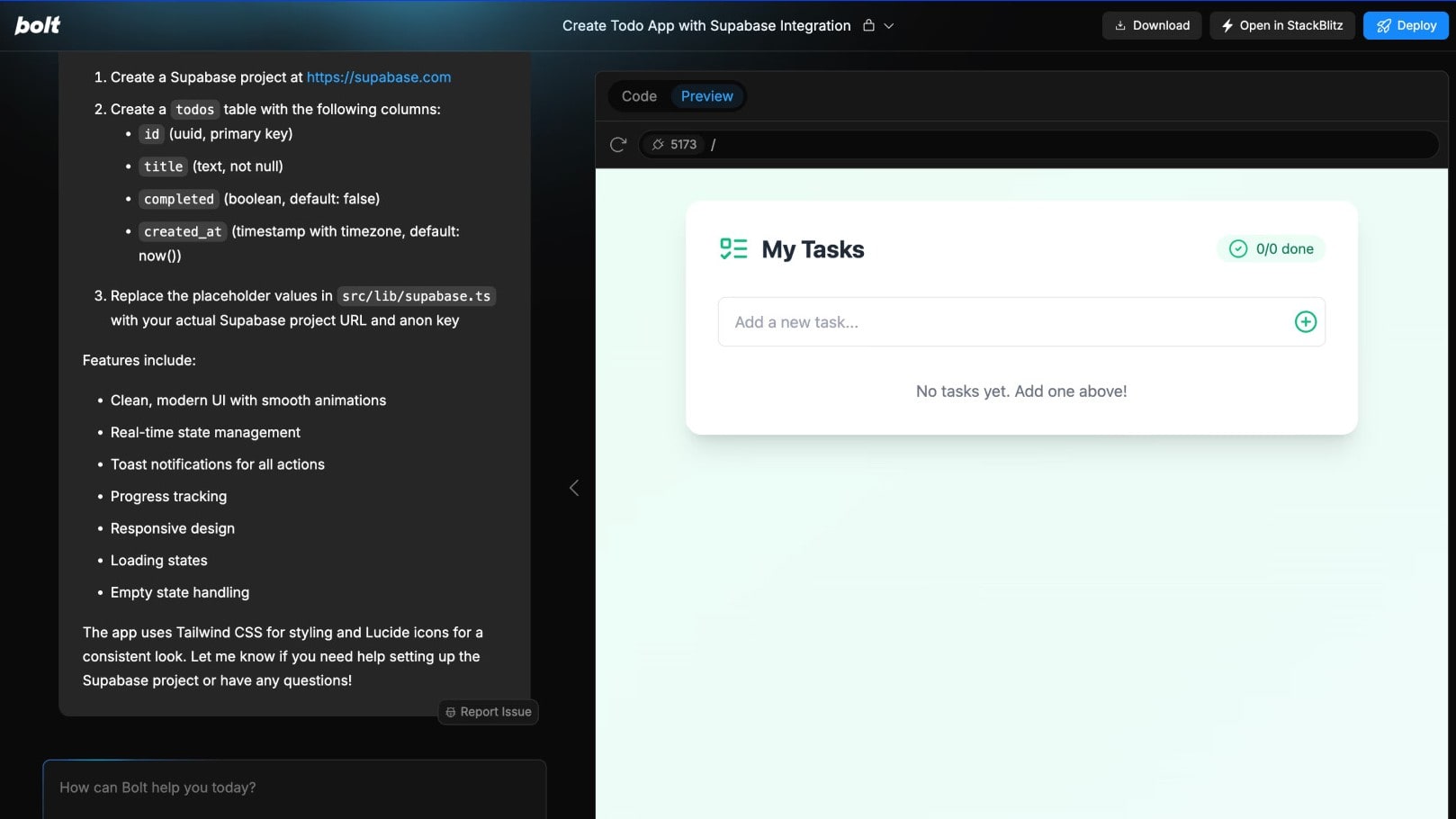
Bolt’s Step-by-Step Supabase Setup with Live Task App Preview
Bolt outshines Lovable when it comes to automated error detection and troubleshooting, giving developers a big advantage during the build process. Bolt’s AI assistant actively scans your codebase for bugs or inconsistencies as you work, then suggests context-aware fixes and can even apply them automatically if you choose. For example, if a developer accidentally introduces a syntax error or a mismatched API call, Bolt’s AI can flag the issue immediately and propose a solution before deployment. This dramatically reduces the time spent on manual debugging and helps maintain higher code quality in fast-moving projects.
In contrast, Lovable focuses more on generating functional apps from prompts and does not provide the same real-time, developer-level debugging tools. For teams that rely on quick iteration and need tight feedback loops during development, Bolt’s built-in troubleshooting features make it a stronger choice when it comes to keeping errors in check and shipping production-ready code with fewer headaches.
08 Lovable vs bolt.new: Which is the best for your business?
Lovable is the best tool for you if:
- You want to turn an app idea into a working prototype within minutes without hiring a full development team or learning how to code complex backend logic or frontend design.
- Your team needs to build internal tools, dashboards, or simple customer portals quickly and values an intuitive, prompt-based system that removes technical roadblocks for non-technical users.
- You’re a startup founder or product manager who wants to validate ideas fast, gather user feedback, and iterate without spending weeks setting up hosting, frameworks, or a local development environment.
- You prefer clear, straightforward pricing with free credits to test your builds before committing to a bigger plan, making it budget-friendly for small teams and early-stage businesses.
- You already use popular tools like Airtable, Notion, or Slack and want an AI development platform that easily integrates with your existing workflow to automate repetitive tasks or connect data.
 You want to turn an app idea into a working prototype within minutes without hiring a full development team or learning how to code complex backend logic or frontend design.
bolt.new is the best tool for you if:
- You want a browser-based development environment that lets you prompt, edit, and deploy full-stack apps instantly, without needing to install local tools or manage complex server configurations on your own.
- Your team needs real-time collaboration, with multiple developers coding together live, similar to how Google Docs works for text but designed specifically for flexible, production-ready software development workflows.
- You rely heavily on GitHub and version control systems to manage branches, commits, and rollbacks, and want tight integration to keep your development process organized and easy to audit.
- You prefer to maintain hands-on control over the AI-generated code so you can refine, optimize, or completely rewrite parts of your app for better performance, scalability, or unique business requirements.
- You need robust API and cloud service integrations like Vercel, AWS, or Firebase, ensuring your deployed apps fit neatly into an existing CI/CD pipeline for faster production releases.
Lovable
Build apps in seconds, not weeks
15% off annual Pro and Business plans
Save up to $500
09 Alternatives to Lovable & bolt.new

Base44
Used by 1880 members
20% off annual plans
Save up to $480

Emergent
Used by 1000 members
30% off monthly and annual plans
Save up to $900

OpenAI - ChatGPT
Used by 684 members

GitLab
Used by 449 members
12 months free on the Ultimate license
Save up to $10,440
00 Promotions on Application Development software
Lovable and bolt.new are great tools, but Secret offers promo codes with discounts on over 2050+ different SaaS solutions. New deals are added regularly, helping you save money on your online subscriptions. Get access to codes for other Application Development software you might want to purchase

Retool promo
1 year free on the monthly Team or Business plan

Make promo
First month free on Pro plan (10,000 credits) + 40% off Pro or Teams annual plans

Code for Linear
1 year free on the Basic or Business plans (2 seats)

Promo codes for Webflow
1 year free on a CMS site plan

Credits for Auth0
12 months free

Airtable discount code
$1,000 in credits for 1 year

Mobbin offer
20% off for 1 year on the Pro plan

Notion deal
6 months free on the Business plan with Unlimited AI

Credits for AWS Activate
Up to $100,000 in credits or 20-50% off your monthly spend through an AWS partner (must be spending $100+/month)

Pagemaker discount
30% off for 1 year
Start saving on the best SaaS
Secret has already helped tens of thousands of startups save millions on the best SaaS like Microsoft Teams, Google Workspace & many more. Join Secret now to buy software the smart way.